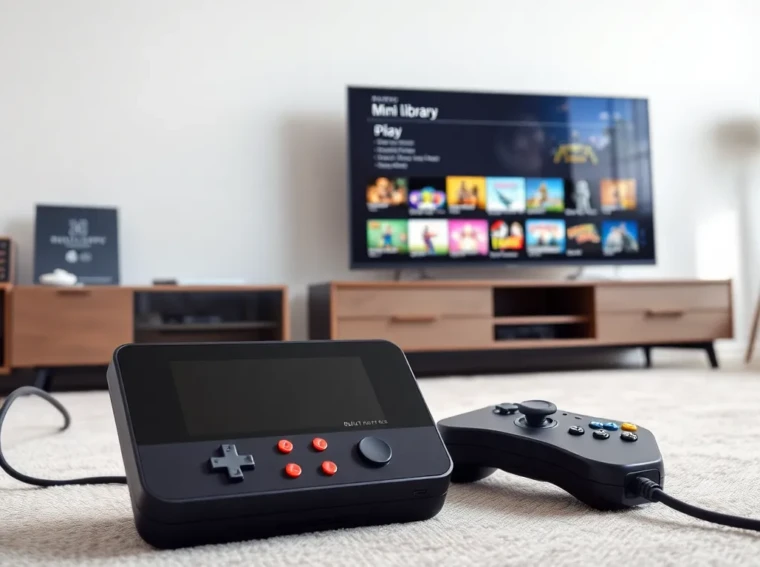
A retro game console with built-in games gives players instant access to classic titles. It plugs into a TV or works as a handheld. The device ships with preloaded games and ready controllers. Buyers want reliable performance and clear emulation. This guide helps buyers compare options and use them well.
Key Takeaways
- A retro game console with built-in games gives instant access to curated classic libraries and removes the need to hunt physical cartridges or discs.
- Prioritize emulation accuracy and game lists—choose FPGA-based or well-documented licensed systems when preservation and timing matter.
- Check hardware build, controller design, HDMI support, and independent input-lag tests to match performance needs and TV compatibility.
- Optimize setup by enabling TV Game Mode, matching output resolution, pairing controllers properly, and using save states for difficult sections.
- Extend longevity with regular firmware updates, save backups, gentle controller care, and authorized repairs to protect warranty and performance.
What Counts As A Retro Console With Built-In Games
A retro game console with built-in games belongs to a class of devices that include preinstalled titles. Manufacturers install original ROMs or licensed ports on internal storage. The units range from small plug-and-play boxes to handheld systems. Some units copy original hardware behavior through software emulation. Other units use field-programmable gate arrays (FPGA) to match original timing and logic.
Collectors and casual players both buy these devices. Collectors want accuracy and preservation. Casual players want simple setup and familiar gameplay. Retail models often ship with dozens of games. Limited runs may include special packaging or bonus content. Many consoles use modern outputs like HDMI and USB controllers. Some include save states, rewind features, and difficulty options.
Key Benefits Of Consoles With Built-In Libraries
A retro game console with built-in games simplifies play. It removes the need to hunt physical cartridges or discs. It lowers the barrier for entry for new players. It also guarantees a curated experience so games work out of the box.
These devices often include modern conveniences. They offer HDMI output, easy pairing of controllers, and user interfaces for browsing. They reduce cost compared with collecting many original systems. They also protect original hardware by providing a digital alternative. Some models provide accurate audio and video filters. Others add modern features like save states and rewind. In short, they let people play classic titles with minimal setup.
How To Choose The Right Built-In Retro Console
Buyers should match needs to features. The decision depends on game quality, hardware build, controllers, and display output. Price and warranty also matter.
###, Game Library And Emulation Accuracy
Choose a console with licensed games when possible. Licensed titles reduce legal risk. Select systems that document their emulation methods. FPGA-based units often offer better timing and fewer glitches. Software emulators can vary by core and version. Check lists that show included games and regional variants.
###, Hardware Quality And Build Durability
Inspect case materials and port quality. Metal or thick plastic lasts longer than thin shells. Look for well-seated ports and firm buttons. Check reviews for drop and wear testing. A solid power connector reduces long-term issues.
###, Controller Options And Local Multiplayer
Evaluate controller design and cable length. Wireless controllers add convenience but need batteries or charging. Local multiplayer matters for co-op or party play. Verify how many controller ports or pairs ship with the unit. Consider third-party controller support and standard USB protocols.
###, Display, Connectivity, And Input Lag
Confirm the console supports HDMI and common resolutions. Some units include integer scaling and bezel options. Input lag varies by model. Look for independent lag tests or reviews. Modern televisions add processing that increases lag. A console with low internal lag helps preserve game feel.
###, Price, Warranty, And Expandability
Compare price against the included game list and hardware quality. Check the warranty length and terms. Some devices allow firmware updates or add-on content. Others lock the library. Buyers should prefer units that allow safe updates and clear customer support.
Popular Types And Representative Models To Consider
The market splits into a few clear categories. Each type suits different priorities like accuracy, portability, or value.
###, Mini Classic Consoles (Plug-and-Play)
Mini classic consoles resemble smaller versions of the original units. They plug into a TV via HDMI. They ship with a fixed game list and one or two controllers. They suit casual users and gift buyers. They often cost less than collectors pay for originals.
###, Retro Handhelds With Preloaded Games
Retro handhelds include built-in screens and battery power. They let players play on the go and use modern screens. They vary by screen quality, battery life, and control layout. Some include microSD slots for updates or extra content.
###, FPGA-Based And High-Accuracy Systems
FPGA-based systems replicate original hardware logic in silicon. They deliver lower timing error and fewer graphical quirks. Enthusiasts prefer them for competitive play and preservation. These systems usually cost more but offer superior fidelity.
###, DIY And Mod-Friendly Options
DIY and mod-friendly options include boards and kits for hobbyists. They let users add their own software, controllers, and cases. These options require technical skill. They reward buyers with flexible upgrades and repairability.
How To Set Up And Get The Most From Your Console
A good setup improves play and reduces frustration. Follow clear steps for first use and adjustments.
###, Hookup And First-Time Configuration
Unbox the console and connect power. Connect the HDMI cable to the TV. Turn the TV to the correct input. Pair or plug in the controllers. Follow on-screen prompts to set language and UI preferences. Register the device if registration benefits include firmware updates.
###, Optimizing Video/Audio Settings For Modern TVs
Set the TV to game mode to reduce processing. Disable motion smoothing and post-processing. Choose the console output resolution that matches the TV for best scaling. Use RGB range settings that match the TV. Adjust audio output for stereo or surround passthrough as needed.
###, Managing Saves, Cheat Codes, And Profiles
Use the console save system for progress and checkpoints. Use save states for hard sections. Store profiles when multiple people play on the same device. Apply cheats carefully and back up saves before experimenting.
Maintenance, Troubleshooting, And Longevity Tips
A little care extends device life and enjoyment.
###, Common Issues And Quick Fixes
If the console fails to boot, check power and cables first. If games stutter, test another HDMI cable and another TV. If controllers disconnect, replace batteries or re-pair. If a game crashes, reboot the device and test a different title.
###, Firmware Updates, Backups, And Repairs
Install firmware updates from the manufacturer when available. Back up saves to external storage or cloud if the device supports it. For hardware faults, use authorized repair centers when possible. DIY repairs can work but they may void warranty.
###, Preserving Controllers And Buttons
Keep controllers dry and clean. Use a soft brush to remove dust from D-pads and thumbsticks. Avoid harsh cleaners on plastic and rubber. Store controllers in a cool, dry place. Replace worn pads and contacts to restore feel.